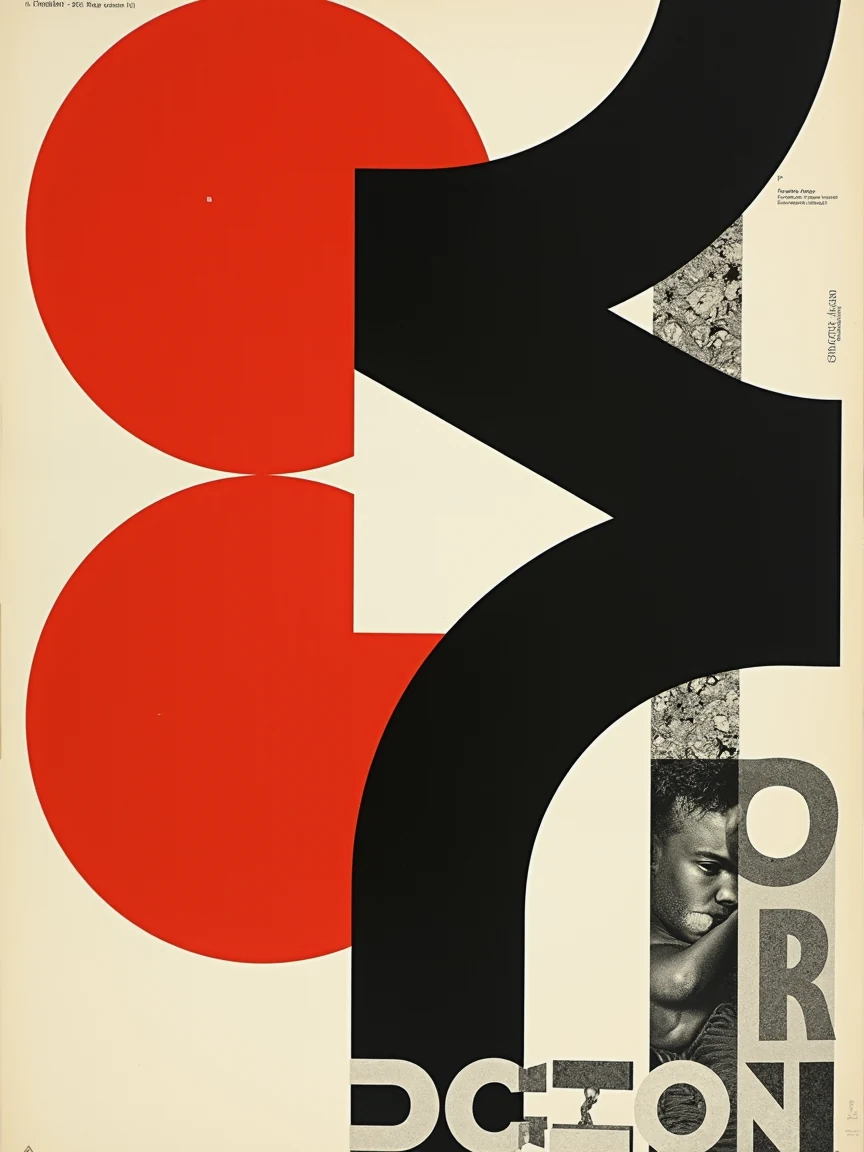
The gallery already has a poster that holds a grid. Open the Swiss typography graphic poster, look at the scarlet circle on black geometry, then run that prompt in the create workspace. Image 3 AI is independent — not OpenAI, not GPT Image. This walkthrough uses that template: what the sheet is for, which settings match it, and how to swap the exhibition for yours without turning the layout into noise.
That file is the template showcase. Compare later generates to this image. Flux will invent letterforms; treat on-image type as a layout sketch and set real copy in Figma if spelling has to be exact. We have no Text-on-Image tool.
What this poster is for
A poster earns its keep when the hierarchy survives at arm's length: one shape, one accent, type that looks like it belongs on the paper. This template is a reference for that discipline, not a print-ready file with your venue name locked. Use it to brief a designer, to test whether a palette still reads at 3:4, or to steal a grid before you write a word of copy.
The placeholder is a modernist exhibition poster: asymmetric grid, scarlet circle over black forms, sans-serif, tactile off-white stock. Keep the grid clauses. Swap the show.
Remix into Create
From the template page, Use This Template (Remix) writes prompt, negative prompt, 3:4, and Flux Studio into /create. 3:4 is in the primary ratio row (1K = 864 × 1152). Output PNG (Lossless). Resolution 1K. 2K and 4K are locked.
| Setting | Value |
|---|---|
| Model | Flux Studio (6 credits) |
| Aspect ratio | 3:4 (864 × 1152 at 1K) |
| Output format | PNG (Lossless) |
| Resolution | 1K |
| Negative prompt | photorealistic, messy, illegible gibberish, clutter, gradients, cheap look |
Studio is the typography model here. Flux Fast (2 credits) will usually trash the grid. Flux Fast/Studio take no reference image.
The gallery prompt
Modernist graphic design exhibition poster in the Swiss International
Typographic Style, bold stark layout with clean asymmetric grid, vibrant
scarlet red circle overlaying stark black geometric forms, crisp modernist
sans-serif typography, tactile off-white heavyweight fine art paper texture,
museum exhibition quality.
Run it once against the showcase. Then swap only the content block — the exhibition, the city, the date — and leave "asymmetric grid", "scarlet" / your accent, "off-white … paper texture".
When lettering fails
Quote the title in the prompt. If glyphs melt, Remix with fewer words on the poster, or add type later. Do not invent an in-app text overlay. Failed jobs refund credits.
FAQ
Why does my poster look like a photograph of a gallery wall?
The negative prompt already bans photorealistic. Keep "graphic design exhibition poster" and the paper texture. Drop interior photography language.
Can I use 16:9 for a web banner?
Yes, but this template was tuned at 3:4. Changing ratio is a new composition, not the same sheet.
Is 1K enough to print?
For a briefing PDF and social, yes. A large offset run wants a dedicated upscaler later — we don't ship one.
Put your show on the same grid
Open the Swiss typography graphic poster, Remix, match the showcase, then swap the exhibition line.
Related: the artisan coffee bag mockup for packaging next to the poster, and the isometric cloud infographic when the same brand needs a diagram.

 Natalie Brooks